Why merging PDFs on Mac shouldn't require a browser tab
You have a contract, an invoice, and a cover letter. They need to be one PDF. The usual advice? Upload all three to some website, wait for a server to stitch them together, then download the result. Your documents pass through infrastructure you don't control, often in a country you can't identify.
Paradise PDF takes a different approach. It's a native macOS application built with Rust and Swift that merges PDF files directly on your Mac. There's no upload step because there's no server involved. Your files stay on your disk from start to finish.
If you regularly merge PDFs on Mac — whether it's combining client documents, joining scanned pages, or assembling reports — you deserve a tool that works as fast as your machine allows, without the friction of browser-based workflows.
How to merge PDF files on Mac with Paradise PDF
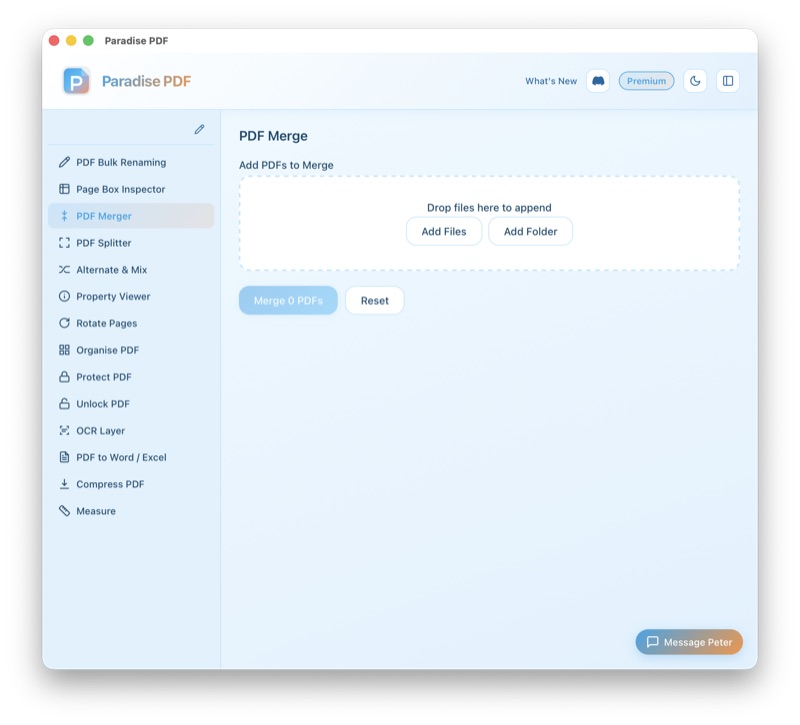
- Open Paradise PDF and select the Merge tool from the sidebar. The interface is clean and purpose-built — no hunting through menus or ribbons.
- Add your PDF files. Drag and drop files from Finder, or click to browse. You can add as many documents as you need — there's no file limit.
- Reorder if needed. Drag files into the exact order you want them in the final document. The preview updates in real time so you can verify the sequence before merging.
- Click Merge. Paradise PDF combines your PDFs into a single file using native macOS APIs. The process is near-instant for typical document sizes.
- Save your merged PDF. Choose where to save the combined file. The original documents remain untouched — Paradise PDF never modifies your source files.
When you need to combine PDFs on macOS
Merging PDFs is one of those tasks that sounds simple until you need to do it properly. Here are the scenarios where Paradise PDF's merge tool earns its place in your workflow:
Assembling proposals and contracts
Combine a cover letter, scope of work, pricing sheet, and terms into a single professional document. Clients receive one file instead of a zip folder of loose PDFs.
Consolidating scanned documents
If your scanner creates a separate PDF for each page, merge them into one continuous document. This is especially common with older flatbed scanners that don't support multi-page scanning.
Building reports from multiple sources
Pull together charts from one department, narrative from another, and appendices from a third. The merge tool preserves formatting and resolution from every source file.
Organising research and reference material
Combine journal articles, whitepapers, and notes into a single reference PDF. Easier to search, easier to share, easier to archive.
Preparing submission packages
Grant applications, university admissions, visa paperwork — any process that requires "one PDF, please" is a merge task. Join PDF files on Mac in the exact order the recipient expects.
Key features of the PDF merger
- Unlimited files: Merge as many PDFs as you need in a single operation. No caps, no queue.
- Drag-and-drop reordering: Arrange files visually before merging. Get the page order right the first time.
- Preserved quality: Pages are combined at their original resolution. No recompression, no quality loss.
- Fast processing: Built in Rust for performance. Merging is handled by compiled native code, not a JavaScript runtime.
- Bookmarks retained: Existing bookmarks from source PDFs are carried into the merged output.
- Non-destructive: Your original files are never modified. The merge creates a new file.
- Works offline: No internet connection required. Merge PDFs on a plane, at a café, or on a network with no web access.
All processing happens on your Mac
Paradise PDF is a native macOS application. When you merge PDFs, the entire operation runs locally on your hardware. No files are uploaded to any server. No data leaves your machine. There's no cloud component, no telemetry, and no analytics tracking what you do with your documents.
This matters for sensitive materials — legal documents, financial records, medical files, HR paperwork. If confidentiality is a requirement, a local PDF merger for macOS is the only responsible choice.
How Paradise PDF compares to other ways to merge PDFs on Mac
Preview.app can technically combine PDFs, but the process is unintuitive — you have to drag thumbnails between windows and remember to close the file a specific way. It's error-prone and doesn't scale past a handful of files.
Browser-based tools require uploading your documents to a third-party server. They work in a pinch, but they're slow on large files, limited by upload speeds, and raise real privacy concerns for anything confidential.
Adobe Acrobat is powerful but expensive — it requires a subscription starting at £15.17/month. For a task like merging PDFs, that's significant ongoing cost for something Paradise PDF handles as part of a one-time purchase.
Paradise PDF sits in the sweet spot: purpose-built for Mac, offline by design, affordable, and fast. It's the PDF merger for macOS that respects both your budget and your documents.
Related tools
Ready to merge PDFs on your Mac?
Download Paradise PDF and combine your first documents in under a minute. No account required.
Download Paradise PDF
macOS 13 Ventura or later · Apple Silicon and Intel